Written by Thomas Melto, CEO of LinkScale. Last updated September 5, 2026.
Your Meta Pixel can be installed perfectly and still miss conversions.
That is not a contradiction. It is the normal state of pixel tracking in 2026. Meta Ads shows fewer purchases than Shopify. The pixel fires on some events and not others. GA4 reports a third number. Stripe records the money that actually moved.
The first reaction is always the same: my pixel is broken.
Sometimes it is. Far more often the pixel is fine and the problem sits around it, in the part nobody audits: attribution windows, consent, browsers, redirects, UTMs, in-app browsers, and everything that happens before the pixel gets a chance to fire.
A pixel measures what it can see. If the path is messy before the visitor reaches your destination page, your conversion data will never be clean, no matter how many times you reinstall the code.
What pixel tracking actually measures
Pixel tracking is browser-side measurement. A small script loads on your page, watches for events you defined, and sends them to Meta with whatever identifying signals the browser still allows it to attach.
That last clause is the whole story. The pixel does not decide what it can send. The browser does.
So when advertisers say "the pixel is not tracking conversions", they are usually describing one of three very different problems, and treating them the same way is how people spend a week fixing the wrong thing.
The difference between a pixel issue and an attribution issue
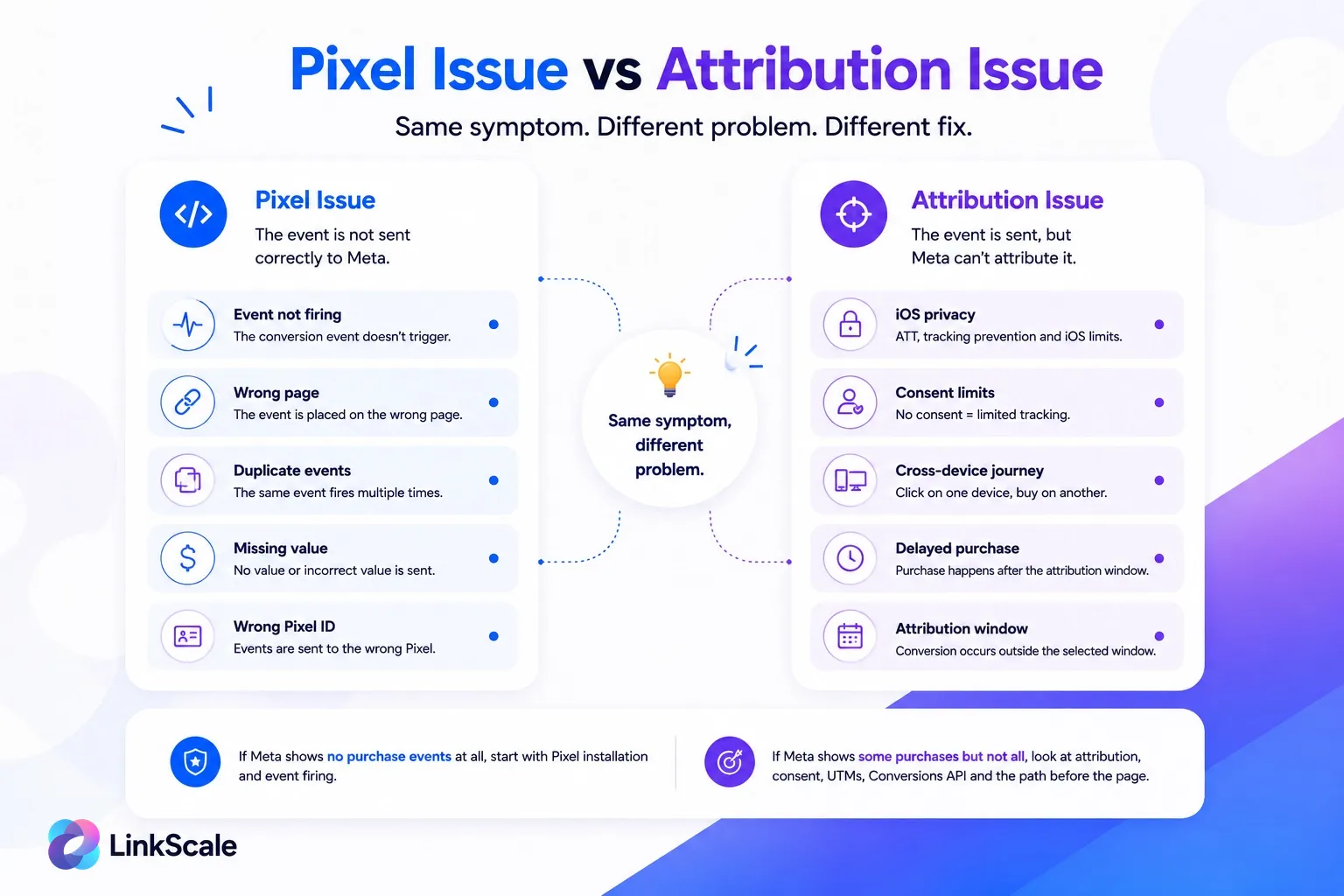
A pixel issue is technical. The event does not fire, fires on the wrong page, fires twice, or sends the wrong value. You fix it in your code, your tag manager, or your thank you page.
An attribution issue is something else entirely. The event fired correctly. Meta received it. Meta simply could not connect it back to the ad interaction with enough confidence to credit your campaign. That happens with delayed purchases, device switching, rejected cookies, in-app browsers, and short attribution windows.
Quick rule: if Meta shows zero purchase events, start with installation and event firing. If Meta shows some purchases but fewer than your store, stop touching the pixel code. The problem is attribution, consent, or the traffic path.
Adding more pixel code will never fix an attribution gap. Widening your attribution window will never fix a broken event.
Why missing conversions rarely means a broken pixel
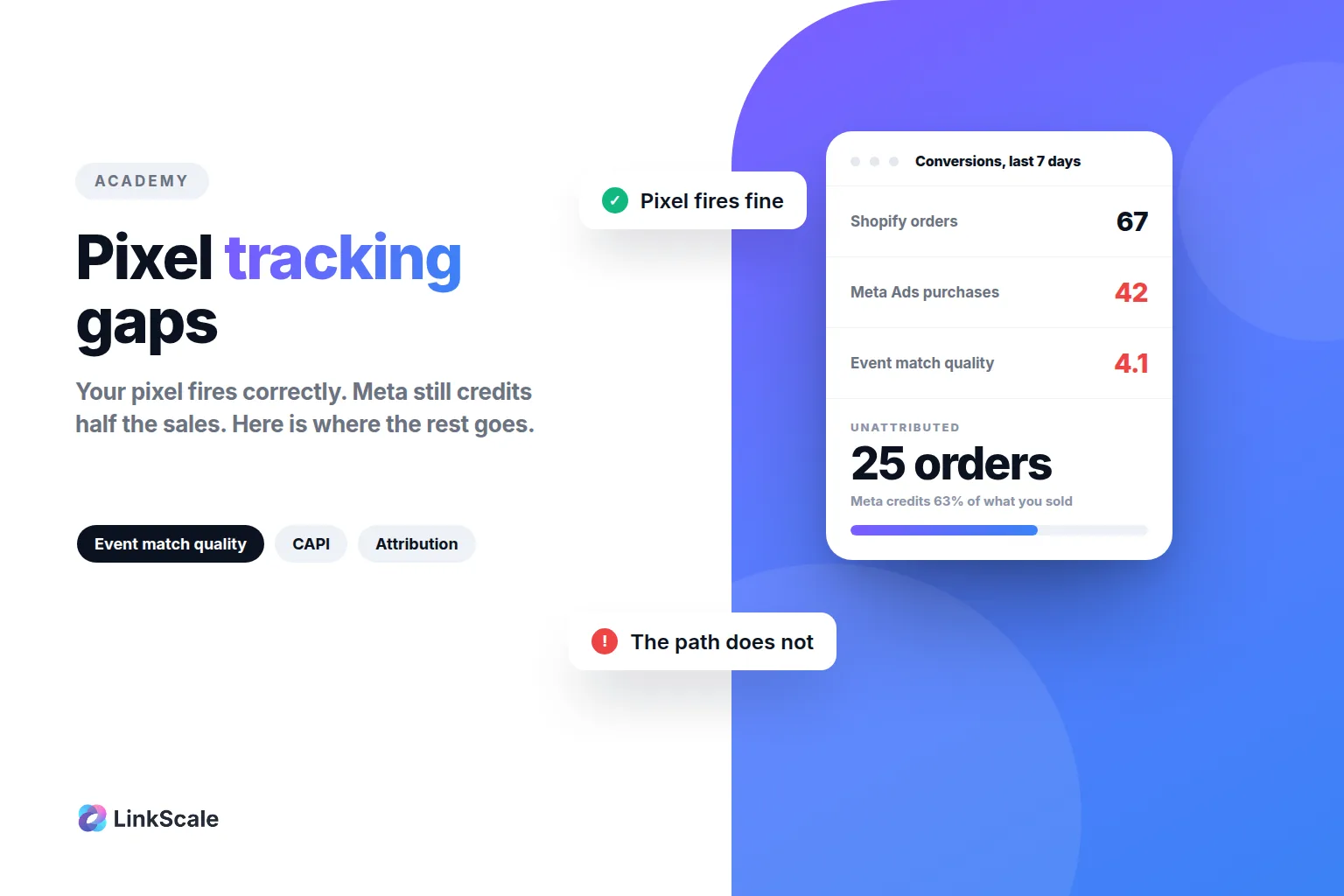
Meta Ads reports 42 purchases. Shopify shows 67 orders. Twenty five sales did not vanish into the void.
Shopify counts transactions. Meta attributes conversions. GA4 tracks sessions. Stripe records payments. Four tools, four questions, four numbers. They were never designed to agree.
The useful question is not whether your pixel is installed. It is: where does the tracking context disappear between the ad click and the conversion?
The most common reasons pixel tracking misses conversions
Setup issues: wrong page, wrong event, duplicate events
Check the boring things first, because they are still the most common failure.
- the pixel is installed on the wrong domain, or twice on the same page
- the purchase event fires on the cart page instead of the confirmation page
- the event fires before the payment is actually confirmed
- the value or currency parameter is missing
- the site was redesigned and nobody re-checked the tag
Meta publishes its own list of pixel errors and warnings you can review inside Events ManagerOpens in a new tab, and that page should be your first stop before you blame attribution for anything.
Browser and privacy limits: consent, ad blockers, iOS
A correctly installed pixel still loses visibility to cookie banners, ad blockers, Safari's tracking prevention, iOS privacy settings, cleared cookies, and users who switch devices halfway through.
This does not make the pixel useless. It makes it incomplete on its own, which is a different claim and the one that matters for how you build the rest of your setup.
Attribution issues: windows, delayed sales, cross-device journeys
A user clicks an Instagram ad on their phone at 11pm, closes the app, and buys on their laptop two days later. Shopify sees the order. Stripe sees the payment. Meta may or may not credit the campaign, depending on your attribution window and how much signal survived the gap.
That is not a bug. That is fragmented attribution working exactly as designed.
Traffic path issues: redirects, UTMs, in-app browsers
This is the one advertisers underestimate, and it is where we see the most damage in the accounts we look at.
Traffic loses context through broken redirects, stripped UTMs, campaign links reused across five different sources, slow mobile landing pages, and in-app browsers that open your page in a sandbox with its own cookie jar. The visitor arrives logged out of a site they are logged into on the same phone.
If the click passes through three hops before it lands, the pixel only ever sees the last one.
Half the "pixel not tracking" tickets we see are a pixel that works fine, connected to the wrong ad account.
Your Meta Pixel ID is the 15 or 16 digit number in Events Manager, next to the data source name. It also appears inside your own page source, in the fbq('init', '...') call. Those two numbers must match, and the pixel must be shared with the ad account actually running the campaign.
Three checks, in this order:
- Open Events Manager, copy the pixel ID from the data source list.
- View the source of your live page and find the
fbq('init', ...) line. Same number?
- In Business Settings, confirm that pixel is assigned to the ad account spending the money.
If step three fails, your events are being recorded against a data source your campaigns cannot use. Everything looks installed. Nothing gets attributed.
You can check what is firing on any live page with a browser inspector, or with our free pixel helper tool, which reads the tags on a URL without asking you to install an extension.
Event match quality is the least discussed number in Events Manager and the one most closely tied to how many conversions you get credited.
It scores, from 0 to 10, how well Meta can match the customer parameters you send with a real Meta user. Email, phone, first name, city, external ID, click ID. Send more of them, hashed correctly, and the match rate goes up. Send only a page view with no customer parameters and Meta is matching on almost nothing.
A score under 5 on your purchase event is worth fixing before you touch anything else in your account. The two cheapest wins:
- pass the hashed email on every purchase event, not just the ones where checkout captured it cleanly
- pass
fbc and fbp (the click ID and browser ID cookies) through your server-side events, which is where most setups quietly drop them
Match quality is not a vanity metric. It is the ceiling on your attribution.
Conversions API: adding server-side signals to browser tracking
Once browsers started refusing to cooperate, Meta's answer was to let your server send events directly. The Conversions APIOpens in a new tab does not replace the pixel. It runs alongside it.
Done right, the two together recover events the browser dropped. Done wrong, they double count everything.
The deciding factor is deduplication. Every event you send from both sides needs the same event_id and the same event_name, so Meta can recognise the pair and keep one. Miss that and your purchase count inflates, your cost per acquisition looks great, and your optimisation degrades because Meta is learning from noise.
Set up deduplication before you turn the Conversions API on, not after you notice the numbers doubled.
Worth knowing: the Conversions API also lets you send events the browser could never see, like a refund, a subscription renewal, or a deal marked won in your CRM three weeks later.
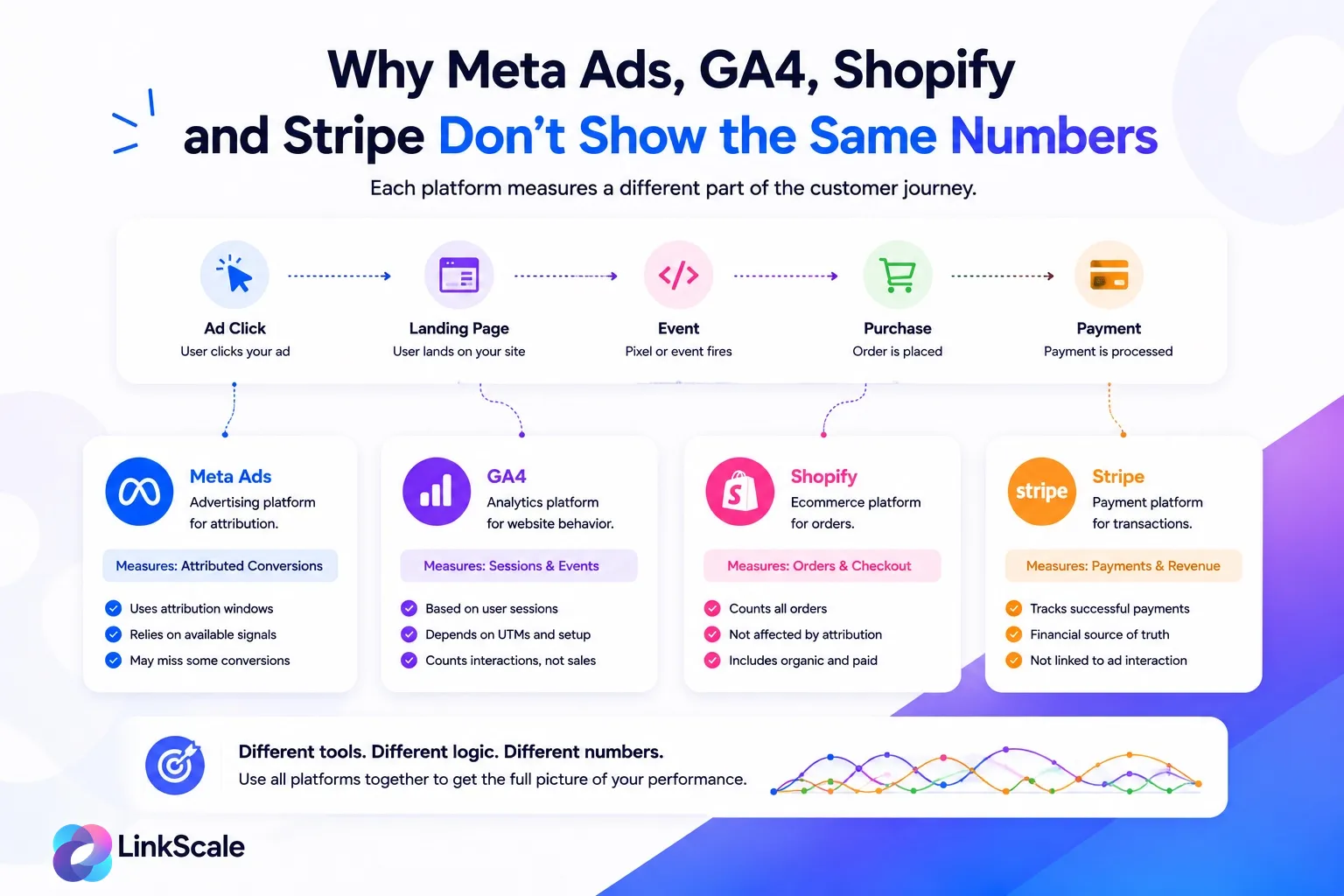
Expecting four dashboards to show the same number is the most expensive mistake in this whole subject. It sends people hunting for bugs that do not exist.
Meta's job is to estimate which conversions deserve credit. Its default attribution window is 7 day click and 1 day view. Change that setting and your reported conversions change with it, without a single thing changing in reality.
A purchase that lands on day nine after the click simply does not exist in Meta's report. Shopify has it. Meta does not.
GA4 measures sessions and events
GA4 counts traffic and behaviour, with its own attribution model and its own session logic. It will disagree with Meta by design.
It will also misclassify your traffic if your UTMs are messy. The same Instagram click can land in referral, paid social, organic social or direct depending on how the link was built, which is why Google's campaign URL parameter referenceOpens in a new tab is worth ten minutes of anyone's time.
Shopify and Stripe measure real transactions
These two are your financial truth. They do not care whether anything was attributable. If Shopify says 67, there were 67 orders.
Shopify answers how many orders happened. Meta answers how many orders it can credit to advertising. Both can be right at once.
Link tracking measures the path before the conversion
There is a fourth layer, and it is the one most accounts are missing entirely: what happened between the click and the landing page.
Which link was clicked, from which source, on which device, through which browser, from which country, with the UTMs intact or stripped, reaching the destination or dying on the way. None of the tools above see that clearly, because all of them start measuring once the page has already loaded.
Quick diagnosis: symptom, likely cause, what to check
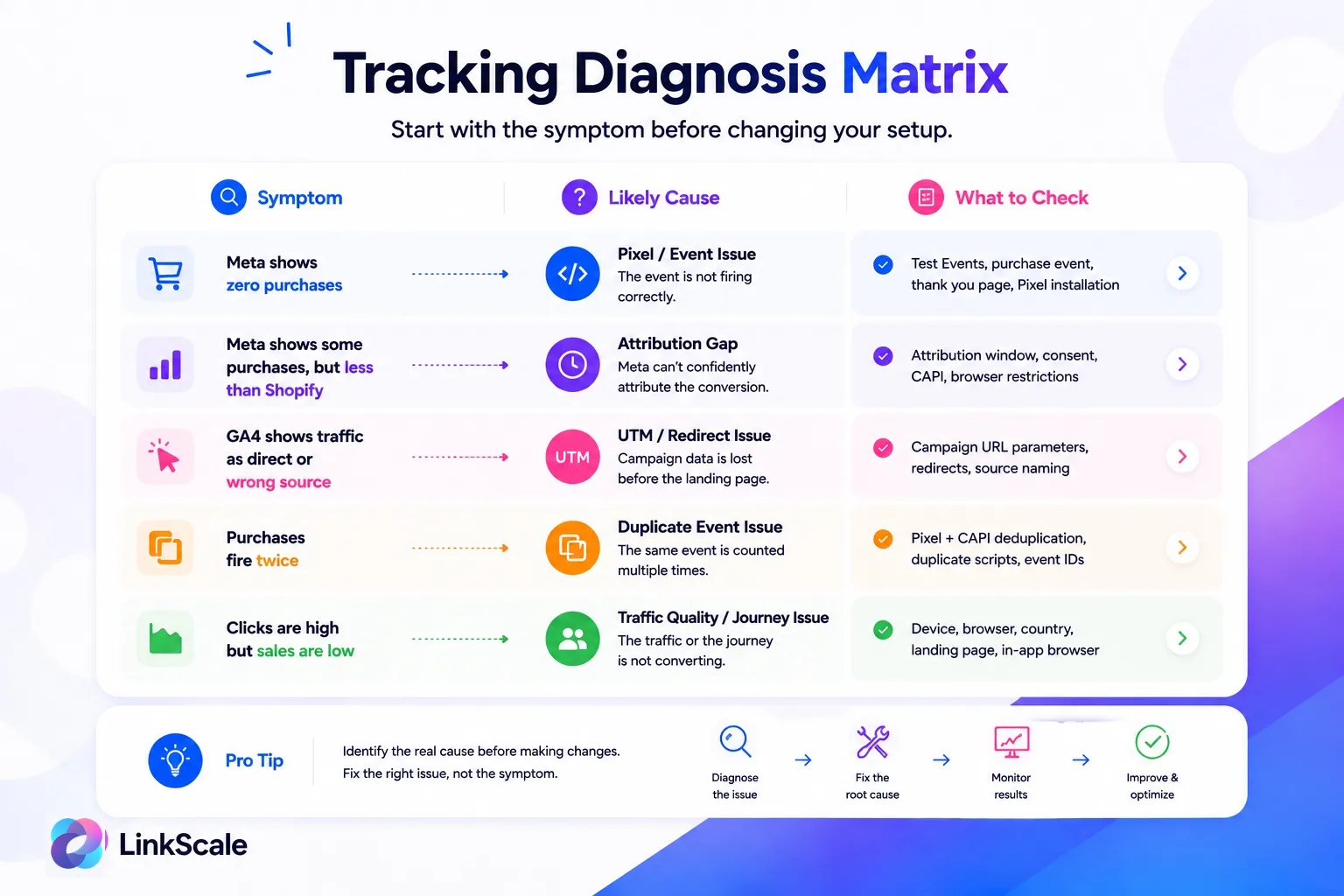
Start from the symptom. The same complaint points to completely different causes.
What to check first when conversions are missing
Check the pixel and its events
One pixel, correct domain, correct Business assets. Purchase event fires after the transaction completes, once, with value and currency attached. Meta's own guidance on installing and setting up the Meta PixelOpens in a new tab covers the mechanics.
Verify in Test Events, not by reading your code. Code that looks right and fires wrong is the entire genre.
Check domain verification, CAPI and deduplication
Domain verified. Pixel and Conversions API connected to the same data source. Event IDs matching across both. Match quality reviewed per event, not as an account average.
If Meta receives duplicated or low quality events, optimisation gets worse, not just reporting. That is the part that costs money.
Check UTMs, redirects and landing page loading
Clean UTMs, consistent naming, redirects that preserve parameters, and a landing page that loads fast on a mid range Android over 4G.
The classic broken setup: one link used for Instagram ads, Facebook ads, a creator post, DMs and a QR code on a flyer. When the numbers look wrong there is no way to tell which of the five caused it. Give every meaningful source its own tracked link.
Check mobile and in-app browser behaviour
Social traffic rarely opens in Safari or Chrome. It opens in the app's own webview, which has its own cookie jar and its own session state.
Test the actual flow, from the actual app: does the page load, does the pixel fire, do the UTMs survive, does checkout work, is the user still logged in. If the journey is broken there, tracking is the smaller of your two problems.
What happens before the pixel fires
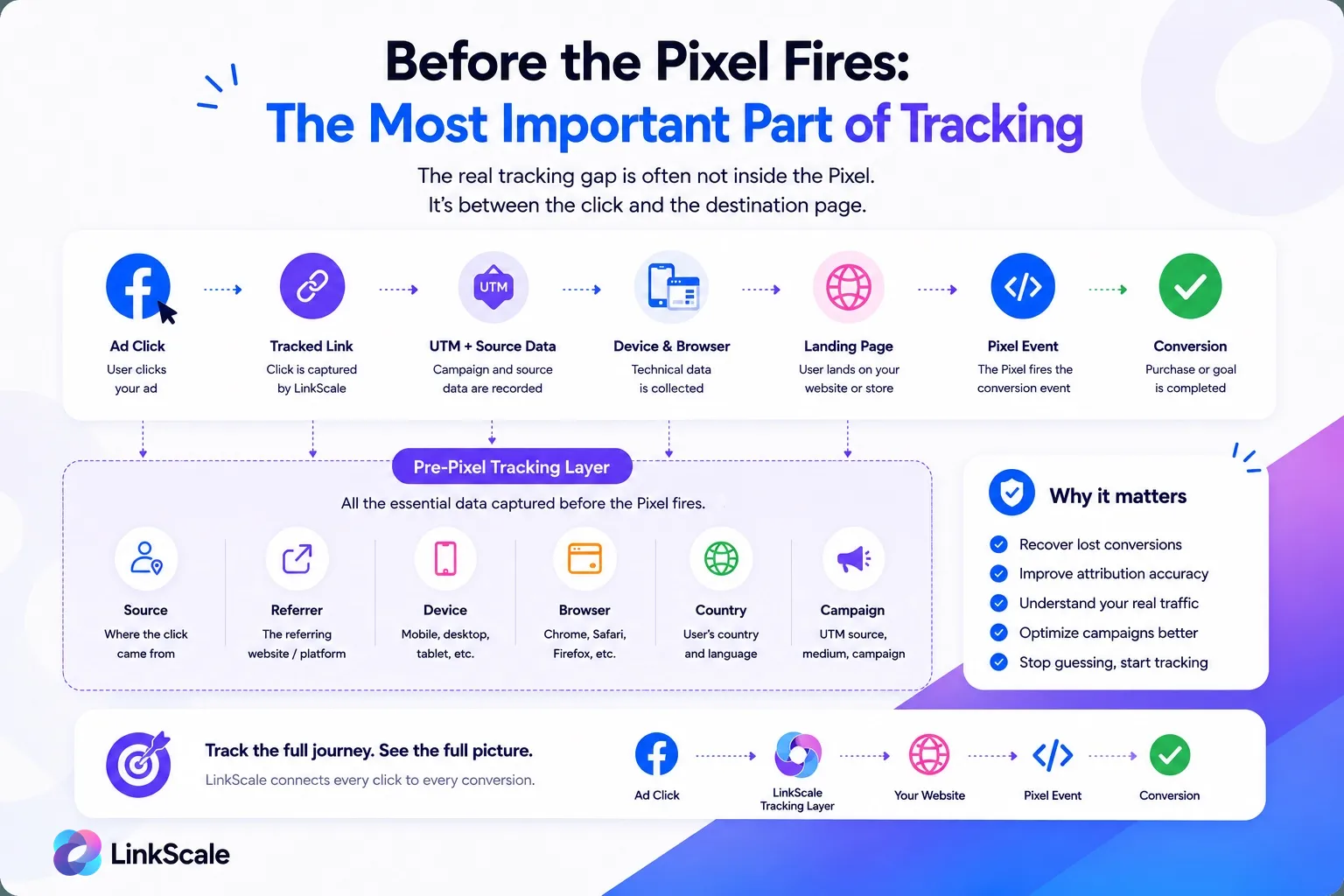
A pixel cannot measure anything that happens before the page containing it loads.
Obvious when written down. Ignored in practice by almost every account we audit.
For paid social the path is never clean. Ads, stories, profile links, bio links, DMs, creator pages, QR codes, retargeting. Each one adds a hop, and each hop is a place where the referrer, the UTM, or the click ID can quietly disappear.
The signals that matter before the pixel: source, clicked link, referrer, device, browser, country, campaign, UTM, webview or real browser, VPN or proxy, whether the destination was actually reached, and how long that took.
If you cannot see that layer, your diagnosis starts too late.
When a link tracking layer becomes useful
If the issue is technical, fix the pixel first
Broken event, no event in Meta, wrong data source. Fix that before anything else. No link tracking tool substitutes for a conversion event that never arrives.
The order is not negotiable:
- Pixel and events working, verified in Test Events.
- Conversions API and deduplication clean, if you use them.
- UTMs and redirects preserving campaign context.
- Link-level tracking for the path before conversion.
If the issue is visibility, track the path before the destination
If the pixel works and the numbers still make no sense, you have a visibility problem, not a tracking problem. You need to know which link started the journey, which source produced the click, what browser opened it, and whether the traffic looked real.
How LinkScale fits between the ad and the destination
LinkScale sits in the gap: a tracked link for every source, campaign, ad or creator, with the click data attached to it.
That covers tracked links, direct links, deeplinks that hand the visitor to their real browser instead of the in-app webview, Meta Pixel integration per link, conversion and custom events, UTM preservation through redirects, source and referrer detection, device, browser and country breakdowns, and traffic quality signals like VPN or proxy detection.
The deeplink point is the one that moves numbers fastest for social traffic. In a LinkScale study across several thousand Instagram accounts, links that handed the visitor off to their own browser reached 71% conversion on the destination platform, because the session, the cookies and the logins were already there.
There is also a video walkthrough if you prefer to watch someone do it: installing and setting up the Facebook Pixel on LinkScaleOpens in a new tab. The wider feature guide covers how tracked links, traffic quality signals and pixel integration fit together.
Your pixel tracking checklist
Pixel and events
- One pixel, correct domain, correct Business assets
- Purchase event fires once, after the transaction, with value and currency
- No duplicate scripts, no events firing on the cart page
- Errors and warnings reviewed in Events Manager
- Behaviour confirmed in Test Events, not assumed from the code
Match quality and Conversions API
- Domain verified
- Hashed email and phone passed on purchase events
- fbc and fbp forwarded through server-side events
- Matching event_id across pixel and CAPI
- Match quality checked per event, target above 6
Path and links
- UTMs clean and consistently named
- Redirects tested, parameters preserved
- One tracked link per meaningful source
- Mobile and in-app browser flow tested end to end
- Click path visible before the landing page loads
Follow that order and you will find the fault faster. Change the campaign, the pixel, the landing page and the attribution window at the same time and you will fix it without ever knowing what was wrong, which means it comes back.
FAQ
Why does Meta show fewer conversions than Shopify?
Because Shopify counts every order and Meta only counts orders it can attribute to an ad within your attribution window. A 20 to 40% gap is normal. A 70% gap usually means low event match quality or a broken traffic path.
Is the Meta Pixel deprecated?
No. It was renamed from Facebook Pixel to Meta Pixel and it still runs. What changed is that it is no longer sufficient on its own, which is why Meta pushes the Conversions API alongside it.
What is a good event match quality score?
Above 6 on purchase events. Below 5 means you are leaving attributed conversions on the table, usually because customer parameters are not being passed.
Where do I find my Meta Pixel ID?
In Events Manager, next to the data source name. It also appears in your page source inside the fbq('init', ...) call. Confirm the two match before troubleshooting anything else.
Does the Conversions API fix everything the pixel misses?
No. It recovers events the browser blocked, but only if deduplication is configured. Without matching event IDs it inflates your conversion count instead of correcting it.
Do in-app browsers break pixel tracking?
Not always, but they degrade it. The webview has its own cookie jar and its own session, so returning visitors arrive as strangers. Deeplinks that open the real browser are the fix.