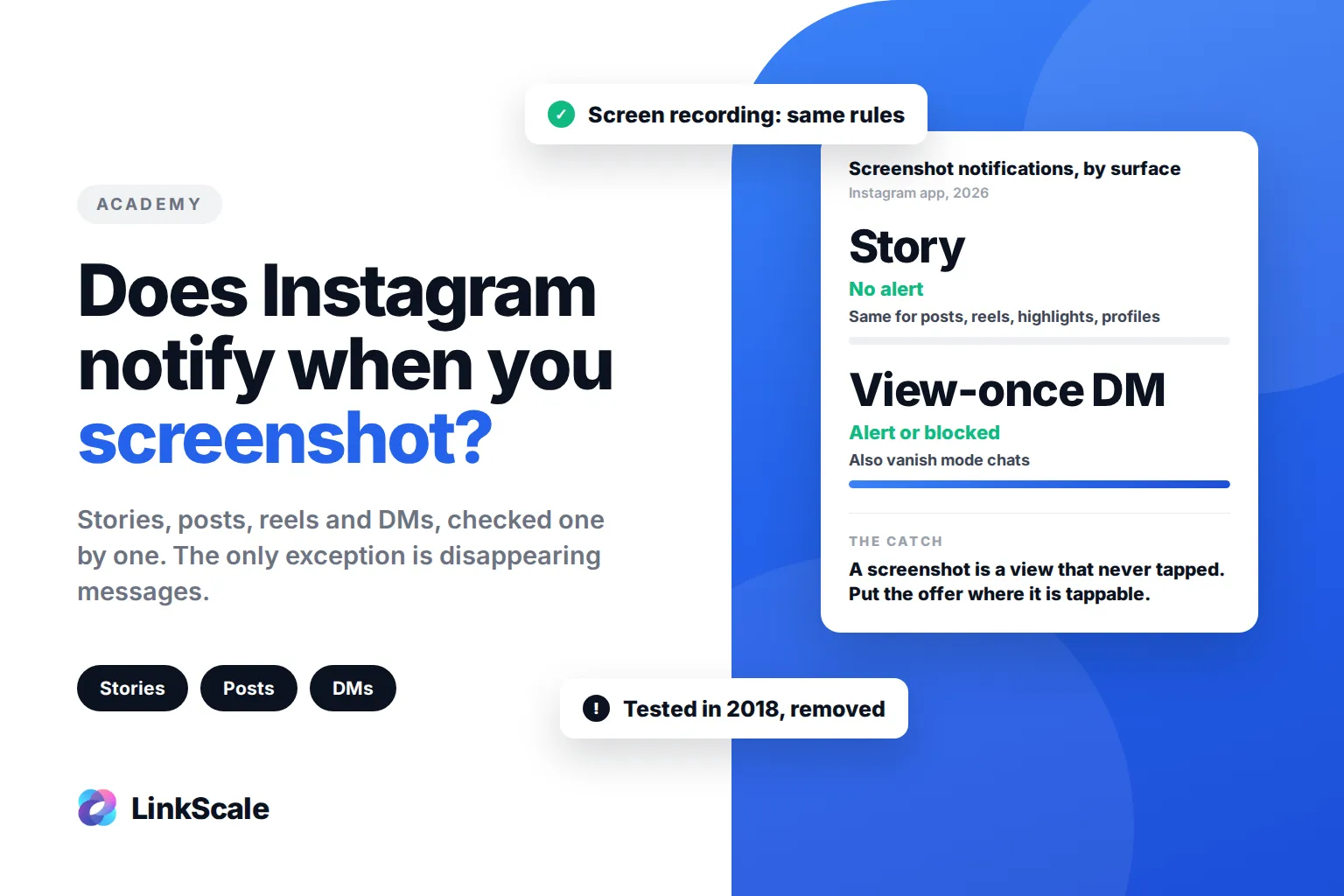
No, Instagram does not notify anyone when you screenshot their story, and the same goes for posts, reels, highlights, profiles and regular DMs. The only exception is disappearing photos and videos sent in DMs, and vanish mode chats: there, the sender is told, and since late 2024 Instagram has been blocking the screenshot altogether.
The story owner sees that you viewed it, not what you did with it. Your name lands in the viewer list the moment you open the story. A screenshot adds nothing to that list, and screen recording adds nothing either.
Does Instagram notify when you screenshot a story?
No. You can screenshot or screen record any story, including Close Friends stories, and the person who posted it gets no alert, no icon and no line in their activity.
This has been true since mid-2018. Between February and June 2018, Instagram tested a screenshot alert on stories: the person who took the screenshot saw a warning the next time they tried, and the poster saw a small camera icon next to that viewer's name. The test was rolled back that summer and has not come back since.
Rumours that it is "returning" circulate every few months, including in 2026. None of them come with a line in the Instagram Help CenterOpens in a new tab or an announcement from Meta, which is where a change like this would appear first.
What Instagram notifies, and what it does not
Here is every surface, in one place.
Screen recording follows exactly the same rules as screenshots. A screen recording of a story is invisible to the poster. A screen recording of a view-once photo is treated like a screenshot.
Does Instagram notify when you screenshot a post or a reel?
No. Posts, carousels and reels are public or follower content, and Instagram treats them that way: no notification, whatever device you use.
The same applies to a post someone sends you in a DM. What triggers an alert is not the DM itself, it is the disappearing format. A post shared into a normal chat can be screenshotted freely.
Does Instagram notify when you screenshot a DM?
Only for disappearing media. When someone sends a photo or video with View once or Allow replay selected, Instagram treats it as private by design. Screenshotting it notifies the sender, who sees a small screenshot icon next to that message.
Vanish mode works the same way for the whole conversation. Swipe up in a chat to turn it on, and any screenshot shows up as a line in the thread for both people.
Since December 2024, Instagram has also been rolling out screenshot blocking for view-once media and vanish modeOpens in a new tab, after testing it from August that year. On accounts where it is active, the screenshot simply does not go through, and the app shows an alert explaining why. Where it is not yet active, the notification still applies.
Regular messages, voice notes and photos sent without the disappearing option are not covered by any of this.
Can you see who screenshots your Instagram story?
No. There is no setting, no Insights figure and no official way to see it. You get the viewer list, and that is all.
Apps and sites that promise to show "who screenshotted your story" cannot do it, because Instagram does not record it anywhere they could read. Most of them ask for your Instagram login, which is the more serious problem: handing your password to a third-party app is one of the fastest ways to get an account flagged or taken over. Unfollower trackers work the same way, which is why we only list the safe ways to see who unfollowed you on Instagram.
If you post something you do not want kept, the only real control is the format. A story, even a Close Friends one, can be captured by anyone who sees it. A view-once photo in a DM is the closest Instagram gets to "look but don't keep".
What a screenshot tells you about your story
For creators, the screenshot question usually hides a more useful one. Someone saw your story, found it worth keeping, and saved it instead of acting on it.
That is common with stories that carry an offer: a discount code, a price list, a link to a page. The viewer screenshots it to deal with later, and later rarely comes. Instagram counts that person as a view. It does not count them as a lost click, because it cannot know.
Three things close that gap.
Put the action where it is tappable. A link sticker turns "I'll come back to it" into one tap now. We cover the placement rules in how to add a link to an Instagram story.
Keep the offer reachable after 24 hours. Add the story to a highlight. Someone who screenshotted it can find it again on your profile, sticker included, instead of looking for a code in their camera roll.
Measure the tap, not the view. Instagram's viewer list tells you who watched. It will never tell you who screenshotted, and it only partly tells you what happened after a tap. A tracked link does: who tapped from which story, which browser they landed in, and whether they reached the page. That is the part LinkScale measures, and it is the number that tells you whether a story is working or just being saved.
If the link lives in your bio rather than in stories, the same logic applies: what "link in bio" actually means covers where that tap goes and what it is worth.
Frequently asked questions
Does Instagram notify when you screenshot a story in 2026?
No. Story screenshots and screen recordings are not notified, including Close Friends stories. Instagram tested alerts between February and June 2018 and removed them.
Does Instagram notify when you screenshot a highlight?
No. Highlights follow the same rule as stories and posts. The owner cannot see that you screenshotted them, and story viewer lists disappear after 48 hours anyway.
Does Instagram notify when you screen record?
Only in the same cases as screenshots: disappearing photos and videos in DMs, and vanish mode. Screen recording a story, a post, a reel or a live does not notify anyone.
Can people see if you screenshot their Instagram story on Close Friends?
No. Close Friends changes who can see the story, not what they can do with it. Screenshots are not notified.
Does Instagram notify when you screenshot a DM?
Only if the photo or video was sent as View once or Allow replay, or if the chat is in vanish mode. On accounts where screenshot blocking has rolled out, the screenshot is prevented instead. Normal messages can be screenshotted without any alert.
Do third-party apps show who screenshotted my story?
No. Instagram does not record story screenshots, so no app can read them. Apps that claim otherwise and ask for your login are a security risk.
Updated 3 October 2026. Written by the LinkScale team.